Paid licenses going unused
Spare, on disabled accounts or unused for 30 days, ready to reclaim.
Products Microsoft 365
Reclaim paid licenses going unused and see who signed in, from where, what each person uses and which devices are non-compliant.
30-minute demo · No per-device pricing
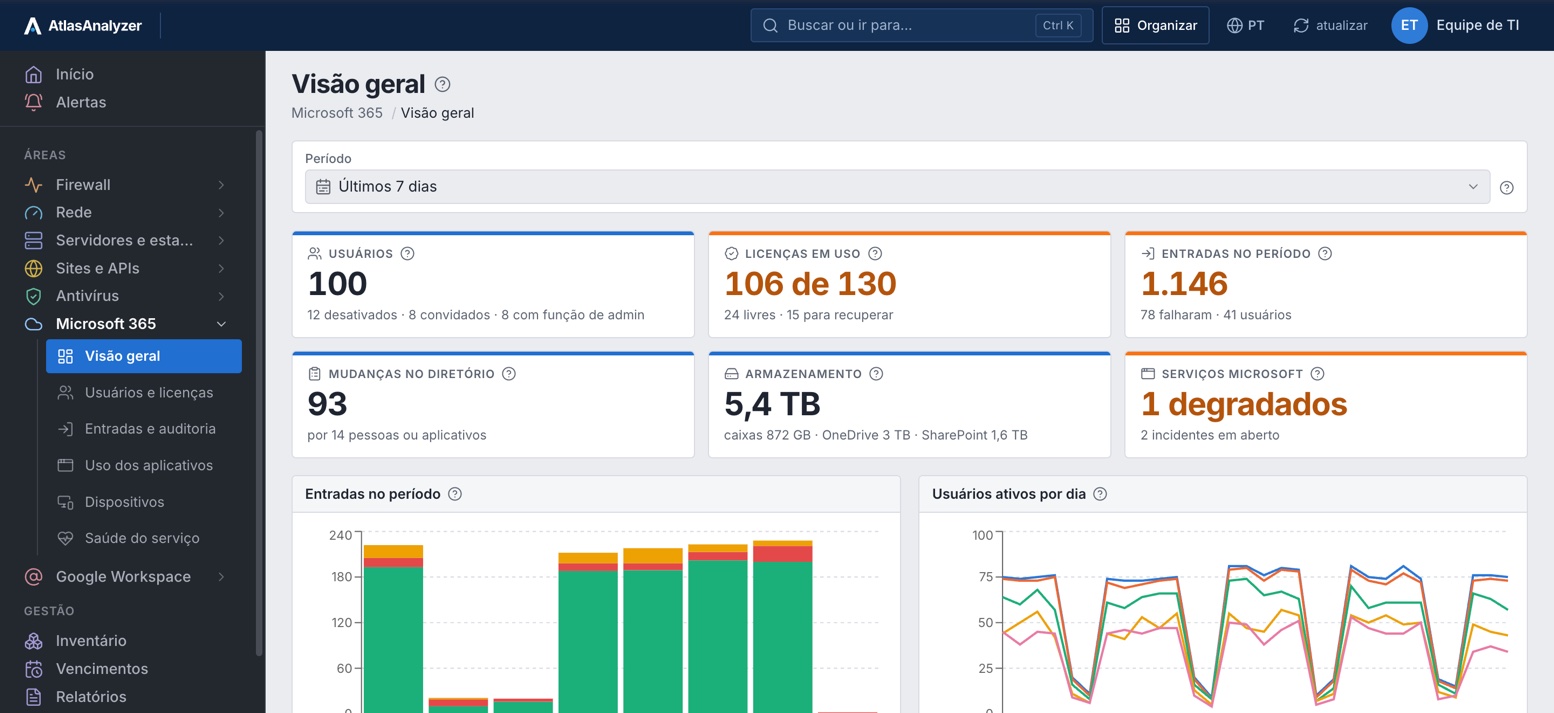
Spare, on disabled accounts or unused for 30 days, ready to reclaim.
Sharing, deleted and downloaded files, sent emails and forwarding rules, by person.
Email, mailboxes, OneDrive, SharePoint, Teams and Office, by day and by person.
Non-compliant, unencrypted and not signed in for 90 days, as Intune reports.
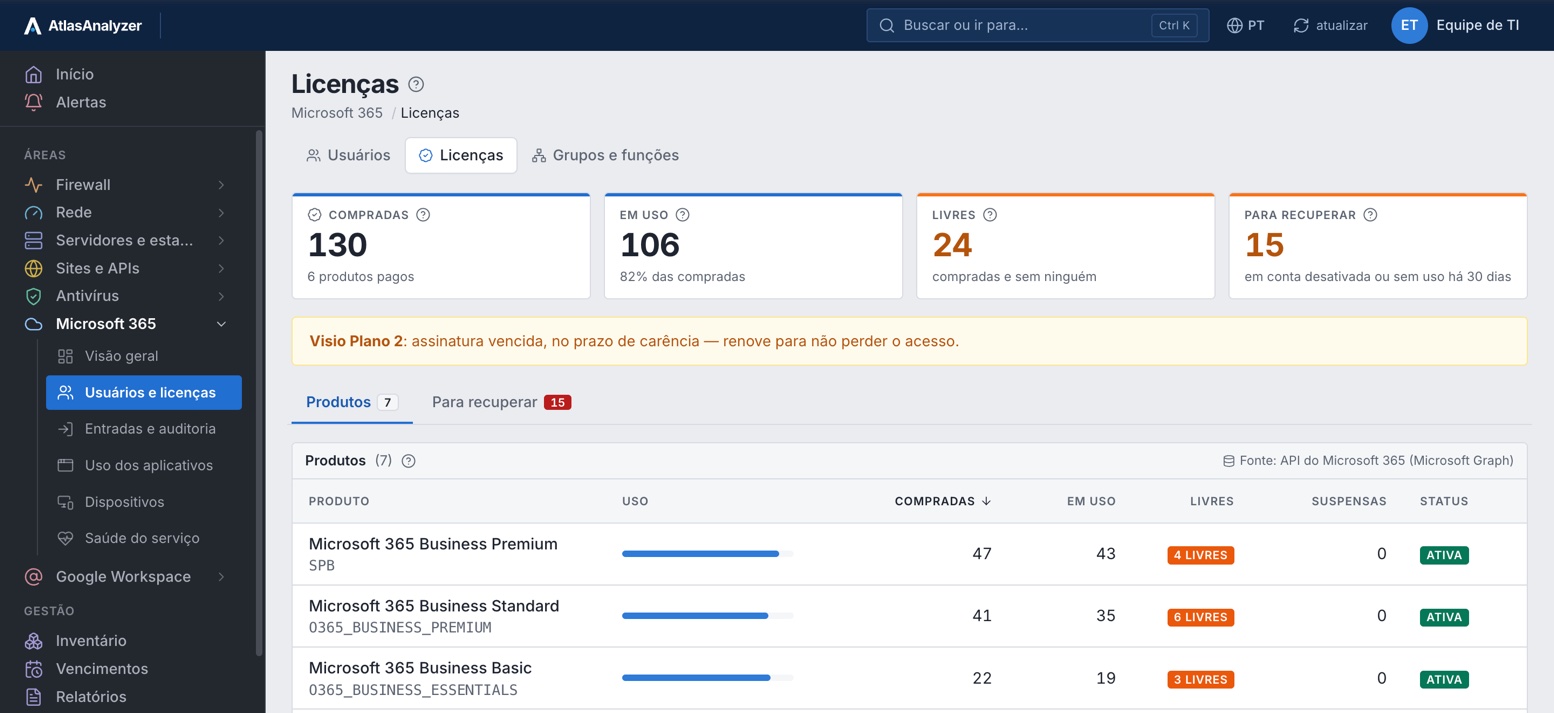
Licenses
Each product with licenses bought, in use, free and suspended, and a notice when a subscription expires.
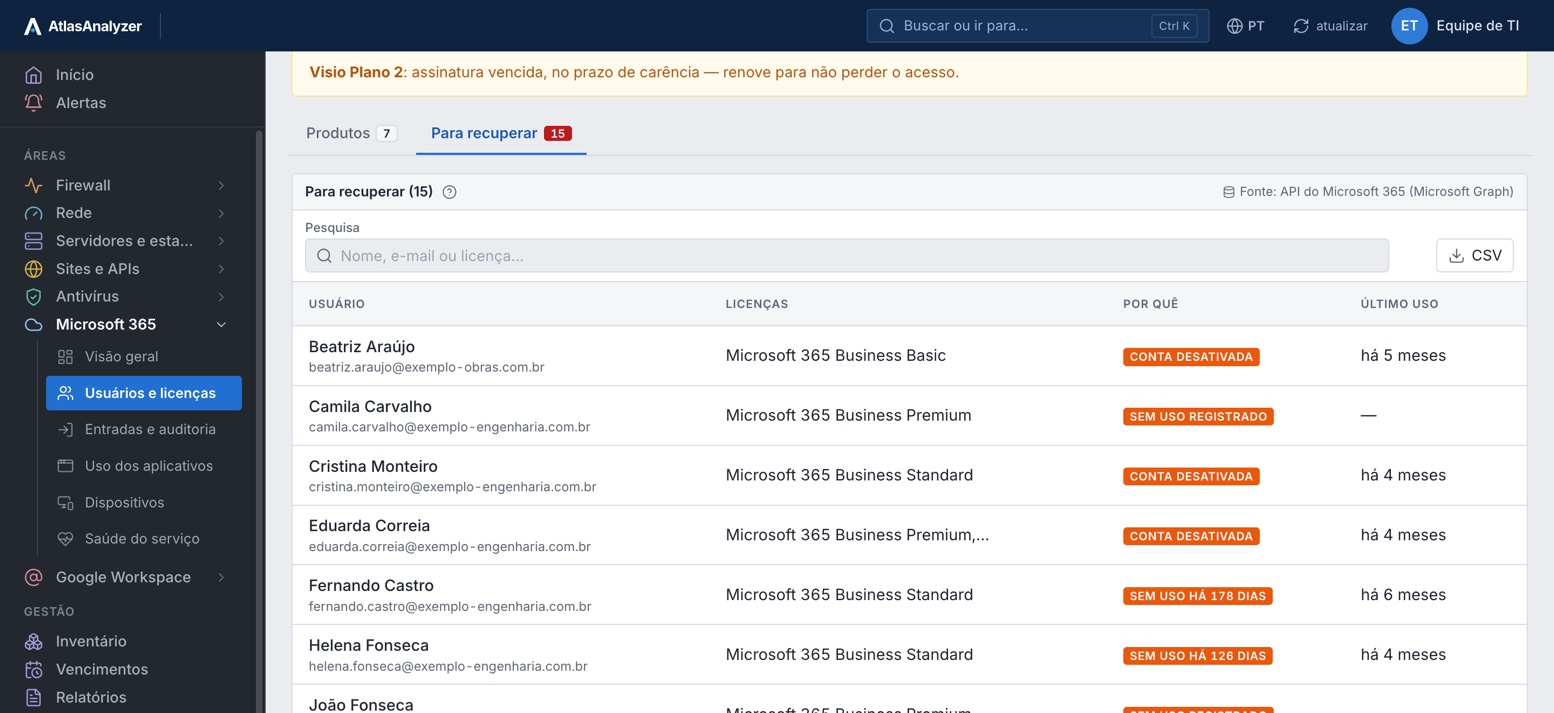
To reclaim
Who holds a license on a disabled account or with no recorded usage, with the license and last use.
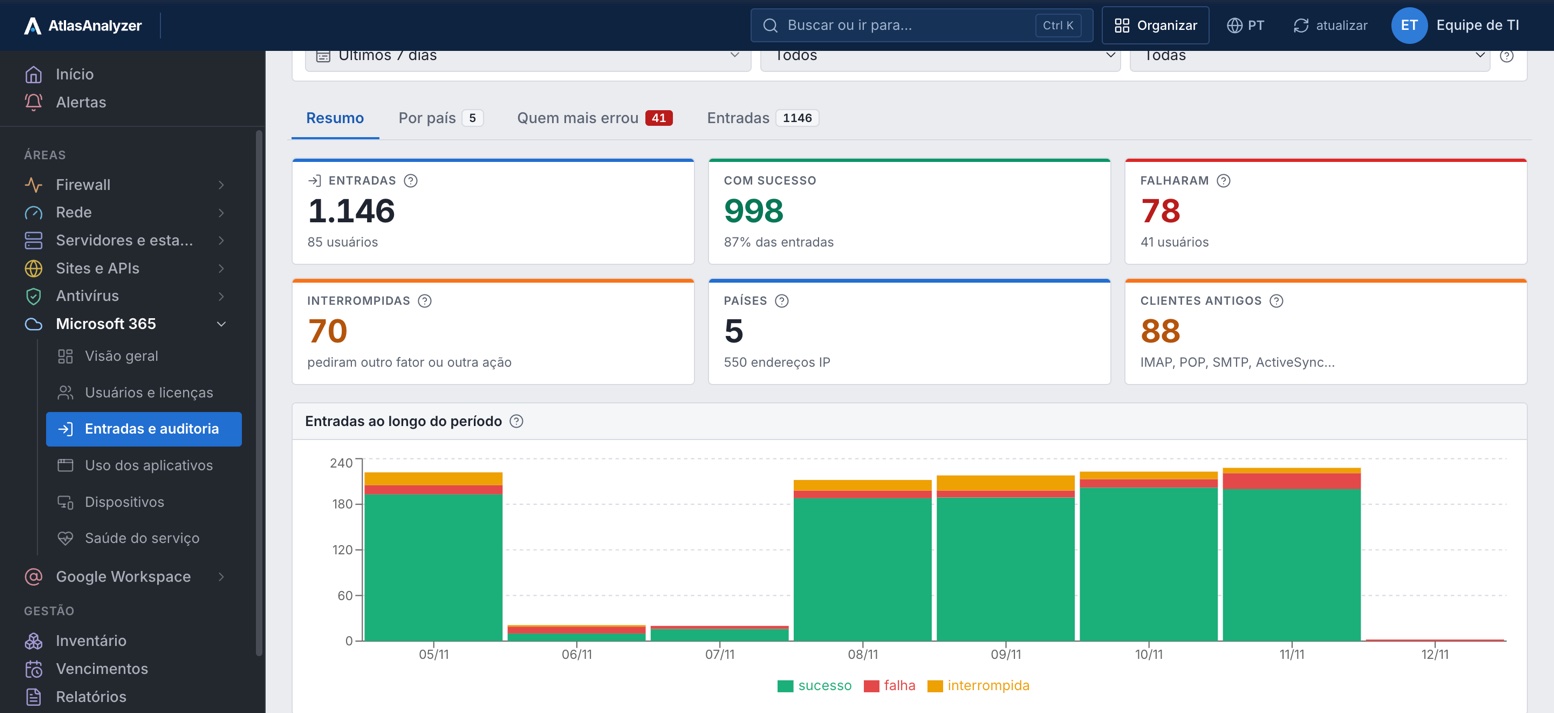
Sign-ins
The period's successful, failed and interrupted sign-ins, the countries and legacy clients (IMAP, POP, SMTP).
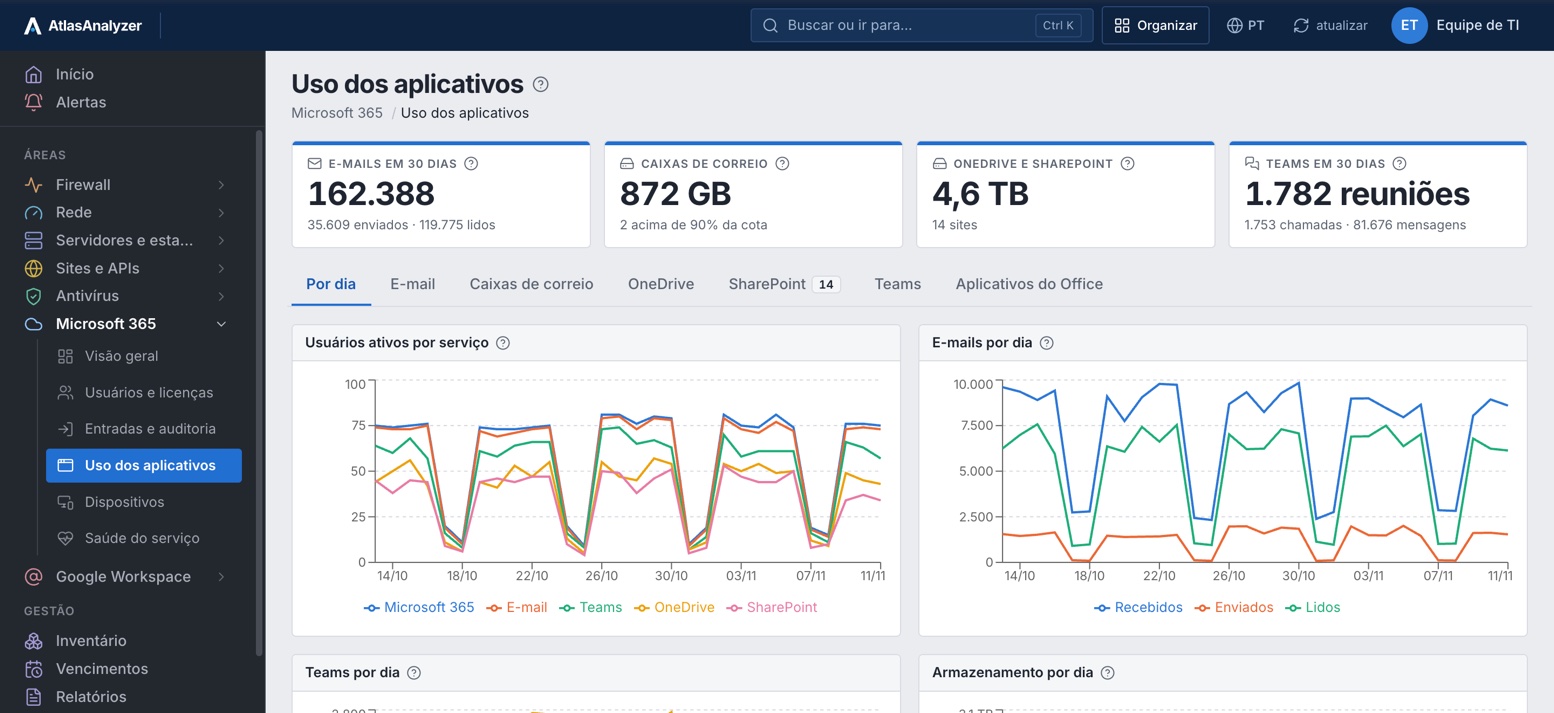
App usage
Active users per service, emails per day, Teams meetings and calls, and OneDrive and SharePoint storage.
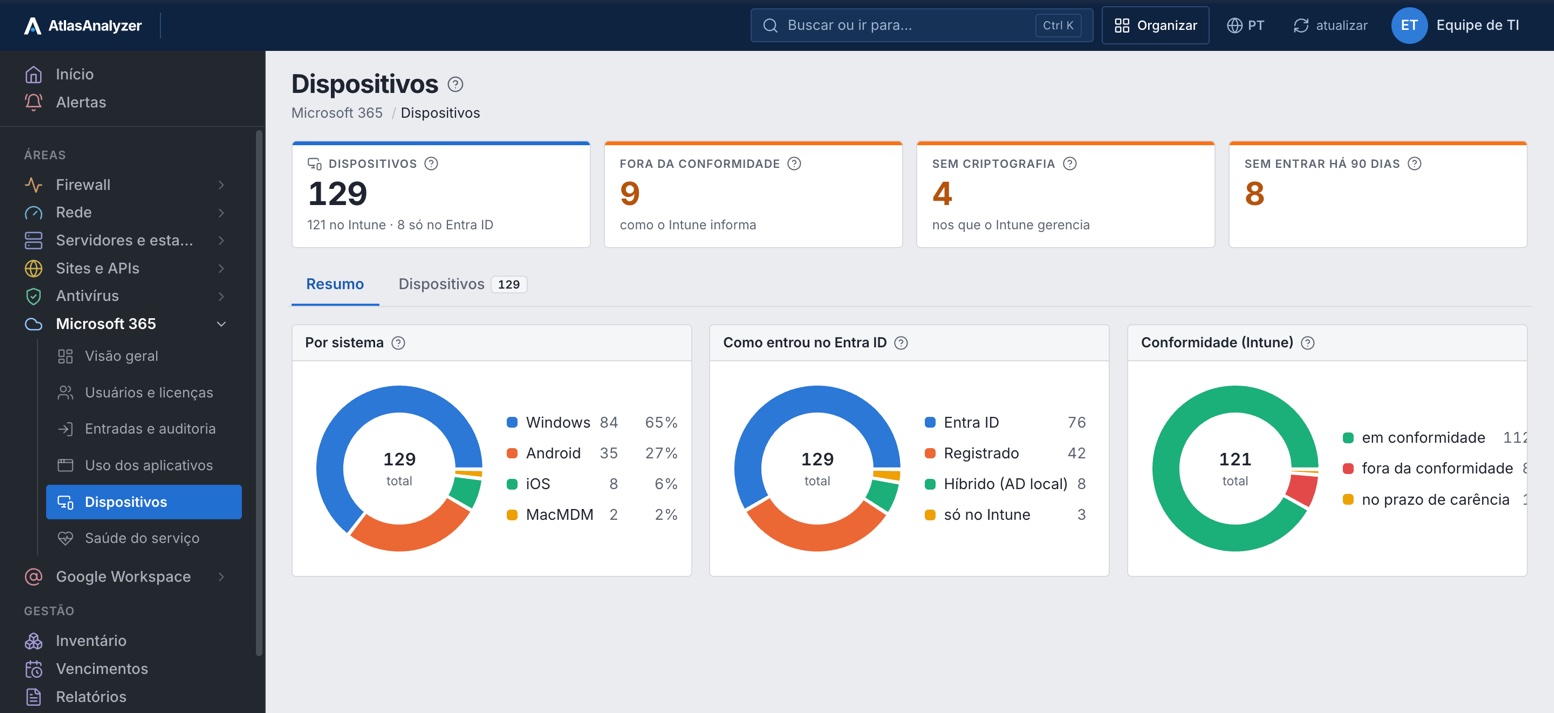
Devices
By OS, by how they joined Entra ID and by the compliance Intune reports, with encryption and last sign-in.
See Microsoft 365 with your own environment's data
Everything AtlasAnalyzer reads from Microsoft 365 through Microsoft Graph, read-only, in 25 features.
Every account with its licenses, roles, last sign-in and usage of each service.
What was purchased and how much is in use, product by product.
Spare licenses and those on disabled or unused accounts, ready to reclaim.
Who has not signed in for a long time, ready for review.
Groups, Teams teams, admin roles with who holds each, domains and sync with on-premises AD.
Who signed in, from where, through which app and device, and the failed sign-ins, with the reason.
Accounts, groups, licenses, roles, apps and policies created, changed or deleted, and by whom.
Sign-ins and audit kept for the plan's retention, from 30 days to 1 year.
What was shared in SharePoint and OneDrive, by whom and with whom: anonymous link, external guest or the whole company.
The files that external guests and people with the anonymous link opened.
Files and folders deleted, restored, downloaded, moved and renamed, by person and by site.
Who sent it, to whom, the subject and whether it was delivered, including what left the company.
Inbox rules and forwarding created in the period, and the rules active today that send email outside.
Configuration changes, other people's mailboxes opened, content searches (eDiscovery) and Intune actions.
Who used Copilot and what it consulted, and the flows, reports and forms created, exported or shared.
Everything one person did, on their profile and in the offboarding report, in PDF or Excel.
Email activity and the size of each mailbox.
Storage and activity in each OneDrive and each SharePoint site.
Teams activity and who uses each Office app, by day and by person.
OS, user, the compliance Intune reports, encryption and last sign-in of each device.
How each Microsoft service is doing right now and the open incidents.
Microsoft's notices about upcoming changes to the environment.
Licenses, users, inactive accounts and service health with incidents, in PDF or Excel.
An app in the customer's Entra ID, with read-only permissions and no write methods.
Whatever Graph refuses, due to permissions or plan, shows as not collected, with what to do.
Through Microsoft Graph, with an app in the customer's Entra ID and read-only permissions.
In Entra ID, with the read permissions listed on screen.
Under Settings › Integrations; the secret is stored encrypted.
Whatever Graph refuses shows as not collected, with what to do.
The screens, CSV lists and the Microsoft 365 report as PDF or Excel.
Through Microsoft Graph and the unified audit log: for email, the subject and recipients; for files, the name and site.
Accounts, licenses, groups, teams, admin roles, domains and sync with on-premises AD
Directory.Read.All
Who signed in, from where, via which app, and what changed in the directory
AuditLog.Read.All
Email, mailboxes, OneDrive, SharePoint, Teams and Office, with Microsoft's 1–2 day delay
Reports.Read.All
OS, user, compliance, encryption and last sign-in
DeviceManagementManagedDevices.Read.All
Microsoft incidents and message center notices
ServiceHealth.Read.All, ServiceMessage.Read.All
Sharing, files, email, rules, administration, Copilot and Teams, from the unified audit log
ActivityFeed.Read (Office 365 Management API)
Sender, recipient, subject, size and delivery, from message trace
ExchangeMessageTrace.Read.All
Each person's inbox rules, as they are today
MailboxSettings.Read
What administrators did to devices and policies
DeviceManagementApps.Read.All
Yes. The audit shows what each person shared, deleted, downloaded and emailed, the rules they created and what they did as an administrator, filtered by person, site and period, plus the offboarding report.
Yes: who sent it, to whom, the subject, the size and whether it was delivered, from Exchange Online message trace.
No. The app has read-only permissions and the connector has no write methods.
It reads usage reports, the audit log and message trace, with file names and email subjects. Email bodies and file contents stay in Microsoft 365.
Microsoft publishes usage reports 1 to 2 days late, and AtlasAnalyzer shows what it has already published.
The refused part shows as not collected, with the permission to grant; the rest continues.
In AtlasAnalyzer Analytics.
In a 30-minute demo, our team shows you AtlasAnalyzer with sample data from the sources you use.
